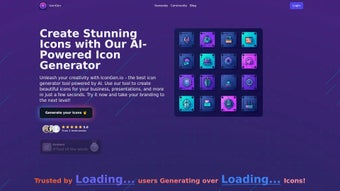

Download Icongen – AI‑Powered Icon Creator for Fast, High‑Quality Designs
Overview
Icongen is an AI‑driven web application that takes the headache out of icon design. Whether you need a sleek badge for a startup logo, a set of consistent symbols for a presentation, or custom graphics for a mobile app, Icongen delivers professional‑grade results in seconds. The platform is built around a simple credit system – new users receive five free credits, allowing them to explore the tool without any financial commitment.
Its intuitive, drag‑and‑drop interface lets anyone, from novice marketers to seasoned designers, generate, edit, and download icons with just a few clicks. The AI engine analyses style preferences, color palettes, and shape trends to produce original artwork that feels both modern and tailored to your brand. Users consistently praise Icongen for its speed, originality, and the quality of the exported files, which come in popular formats such as PNG, SVG, and ICO.
Because the service runs entirely in the browser, there’s no need for bulky installations or complex licensing agreements. Instead, you enjoy a secure, cloud‑based workspace that updates automatically, ensuring you always have access to the latest design algorithms and style libraries. In short, Icongen offers a fast, reliable, and cost‑effective solution for anyone who needs high‑impact icons without the steep learning curve of traditional graphic‑design software.
Moreover, the platform’s GDPR‑compliant data handling guarantees that all your design assets remain private, while the built‑in version control lets you revert to previous iterations if a design experiment doesn’t work out. This combination of speed, security, and flexibility makes Icongen a compelling choice for freelancers, small businesses, and larger enterprises alike.
Key Features and Design Capabilities
- AI‑Generated Icon Variations: Instantly produce multiple design concepts based on a single keyword or brief.
- Extensive Style Library: Choose from flat, line, glyph, 3‑D, gradient, and hand‑drawn aesthetics.
- Customizable Parameters: Adjust color schemes, stroke weight, corner radius, and shadow depth.
- Batch Generation: Create entire icon sets (up to 20 icons) with a single credit for cohesive branding.
- High‑Resolution Export: Download icons in PNG (256 px–4096 px), SVG (vector), or ICO (Windows icon) formats.
- Brand‑Safe Color Palettes: Built‑in palettes aligned with popular brand guidelines (Material, Apple, Google).
- Responsive Preview: See how icons look on desktop, mobile, and tablet mock‑ups before downloading.
- Credit System with Free Trial: Five complimentary credits let you test all premium features.
- Secure Cloud Storage: Your projects are saved in an encrypted workspace, accessible from any device.
- Continuous Updates: New styles and AI improvements are rolled out automatically, no manual updates required.
Beyond the listed features, Icongen’s AI engine learns from each generation, improving its suggestions over time. The platform also integrates a simple naming convention tool that automatically adds SEO‑friendly file names, helping designers streamline their workflow. For teams, the shared workspace option lets multiple users collaborate on a single icon set, ensuring consistency across departments.
The system records version history, so team members can review changes, leave comments, and approve final assets before export. Integration with popular project‑management tools such as Trello and Asana is possible through webhooks, allowing you to push newly created icons directly into ongoing design sprints. Pricing is transparent: after the free credits, additional credit packs start at $9.99 for 50 credits, with volume discounts for larger purchases.
This flexible model makes Icongen suitable for occasional hobbyists who only need a handful of icons each month, as well as agencies that generate hundreds of assets weekly. The combination of these capabilities makes Icongen a versatile tool that can replace several standalone graphic‑design utilities, saving both time and money while keeping the creative process centralized in one secure, cloud‑based hub.
Installation, Usage & Compatibility
Because Icongen is a fully web‑based solution, there is no traditional installation process. To get started, simply visit the official website, create a free account, and you’ll be granted five starter credits. The sign‑up process takes less than a minute and only requires an email address or a social‑login option such as Google or Apple ID. Once logged in, you’ll land on the dashboard where you can either start a new project or explore the community gallery for inspiration.
Step‑by‑step usage guide:
- Enter a Prompt: Type a keyword or short description (e.g., “minimalist finance icon”). The AI begins generating options instantly.
- Select a Style: Choose from the style library or let the AI recommend a suitable aesthetic based on your prompt.
- Customize Details: Use the side panel to fine‑tune colors, line thickness, and background shapes. Real‑time preview updates keep you in control.
- Download or Save: Once satisfied, click “Download” to receive the icon in your desired format. Each download consumes one credit; batch downloads consume multiple credits according to the size of the set.
- Manage Credits: Monitor remaining credits from the account panel. Additional credits can be purchased instantly via secure payment gateways.
- Team Collaboration (Optional): Invite teammates to a shared workspace, assign roles, and leave feedback directly on the canvas.
Compatibility: Since Icongen runs in any modern browser, it works on Windows 10/11, macOS Monterey and later, Linux distributions, as well as mobile platforms like Android 8+ and iOS 13+. The responsive design ensures a smooth experience whether you’re on a desktop, tablet, or smartphone. No plugins or extensions are required, and the service adheres to GDPR and CCPA privacy standards, guaranteeing that your design data remains private and secure.
For power users, Icongen offers an API that can be integrated into existing design pipelines or CMS platforms, enabling automated icon generation at scale. The API uses standard REST calls and returns JSON payloads with download links, making it straightforward to incorporate into custom workflows. Detailed documentation includes rate‑limit information, authentication via API keys, and example code snippets in JavaScript, Python, and Ruby, helping developers get up and running in minutes.
Support is available through a knowledge base, live chat, and community forum where users share tips, style presets, and usage scenarios. Regular webinars showcase new features and best practices, ensuring you can extract maximum value from every credit you purchase.
Pros, Cons, FAQ & Final Thoughts
Pros
- Lightning‑fast AI generation saves hours of manual design work.
- Wide range of styles and customization options fits any brand identity.
- No software download; works in any modern browser.
- Free starter credits let users test the platform risk‑free.
- High‑resolution, vector‑ready exports suitable for both web and print.
- Secure cloud storage and GDPR compliance protect user data.
- Team collaboration workspace streamlines multi‑designer projects.
- Extensible API enables bulk generation and integration with existing pipelines.
Cons
- Credit system may feel limiting for heavy users without a subscription.
- Advanced editing (e.g., layer manipulation) is not as deep as Adobe Illustrator.
- Reliance on internet connection; offline work is not possible.
- Learning curve for API usage may require basic programming knowledge.
- While most styles are extensive, ultra‑specific niche aesthetics might require manual tweaking.
Frequently Asked Questions
How many free credits do I get and how long do they last?
New users receive five free credits upon registration. Credits do not expire as long as the account remains active.
Can I use the icons for commercial projects?
Yes. All icons generated with Icongen are royalty‑free for personal and commercial use, provided you comply with the terms of service.
What file formats are available for download?
Icongen offers PNG, SVG, and ICO formats. PNG is available in multiple resolutions, SVG is vector‑based for unlimited scaling, and ICO is optimized for Windows applications.
Is there an API for bulk icon generation?
Yes. Icongen provides a RESTful API that lets developers generate icons programmatically, retrieve download links, and manage credits via secure tokens.
How secure is my data on the platform?
Icongen uses SSL encryption for all data transfers and stores project files in encrypted cloud storage. The service complies with GDPR and CCPA regulations.
Conclusion – Should You Download Icongen?
Icongen stands out as a modern, AI‑powered solution that democratizes high‑quality icon design. Its browser‑based architecture eliminates the friction of installations, while the credit system offers a low‑risk entry point for freelancers, startups, and larger design teams alike. The extensive style library, real‑time customization, and export options make it a practical alternative to heavyweight graphic suites when the sole focus is icon creation.
Although power users may miss deep vector editing features, the speed, ease of use, and commercial‑ready outputs more than compensate for those limitations. If you’re looking for a secure, fast, and affordable way to generate custom icons for branding, presentations, or app development, Icongen is a worthy addition to your design toolkit. Download Icongen today, claim your free credits, and start creating stunning icons in seconds.



.png)



